Building Awesome User (and Agent) Journeys with WebMCP

Thanks to André Bandarra at Google for help and feedback on this post.
There are dozens of guides on how to technically implement WebMCP on your website (here's ours). They cover anything technical: how to register tools, coding best practices, how to generate evals, and so on.
But there are approximately zero on what to build as a site owner. What kinds of consumer (or agent) experiences WebMCP actually supports, which tools deserve to exist and why, and — most importantly — how to use WebMCP to create coherent user journeys on your site that generate value for you, the site owner, and for your users.
This is a quick guide about how to think of WebMCP from that perspective.
Who actually uses your WebMCP tools?
We like to bucket two journey types. Both look similar in code, but they represent a different user or agent journey.
1. Co-browsing. A human is actively looking at your site while an AI assistant rides along in the browser. An example is Gemini in Chrome — a Gemini assistant embedded directly into the browser, which is expected to support WebMCP tools soon. In this case the user literally talks to your website: the assistant discovers your tools, calls them on the user's behalf, and the page responds right in front of them. The human is present to control the experience in front of their eyes.
This shines in two kinds of places. The first is consumer experiences with rich interfaces — travel sites are the canonical example. These interfaces can have too many buttons, or complex search with many filters: "I want a hotel on these dates, for kids these ages, in this budget, close to the beach." One sentence instead of eight dropdowns. The second is applications and dashboards that are hard to navigate, where users would rather say what they need in plain language than hunt for the right screen.
Much of the industry assumed MCP and MCP Apps would solve this by pulling everything into the chat window. MCP Apps are great when the task fits in a card — but many interfaces are too rich to compress into ChatGPT or Gemini. The good old website is still the best rendering surface for your product. It just needs to learn to speak the agentic language. WebMCP solves for this.
2. Remote execution. WebMCP was designed for co-browsing — that's the stated goal of the standard. But nothing technically stops a remote agent from calling the same tools with no human watching the screen. As a site owner you can block or throttle this with good old bot protection, which makes remote execution effectively opt-in. Some sites will fight it, and that's legitimate — plenty of flows only work with a human on the page: upsells, merchandising, the brand experience itself.
These two journeys have different users and different trust levels. Design for each deliberately.
Start from outcomes, not from your API
The wrong way to design WebMCP tools: wrap every endpoint your website exposes. You'd be surprised how many WebMCP SDKs and skills push exactly this naive approach — auto-generate a tool per endpoint and call it agent-ready. The right way is to actually ask what outcome your website exists to produce:
- A dental clinic exists to produce a booked appointment.
- A marketplace exists to produce a purchase.
- A docs site exists to produce information for a developer.
Now work backwards from that outcome. What does a user need to know, compare, and decide before the outcome happens? Every step in that chain is a candidate tool. This approach creates agent journeys on your site, composed of tools and outcomes. It also helps you measure the actual ROI on WebMCP — not just vibes — because you can track user journeys, where they drop off, and so on.
The three layers of tools
Once you have the outcome chain, sort your candidate tools into three layers:
Answer tools are read-only. They give structured, correct answers about your products, inventory, availability, pricing, and policies. Lowest risk, highest immediate value — ship these first. They're also what saves you from an AI assistant guessing about your business from stale training data, or trying to infer answers by scraping your site. As journeys get more complex, scraping requires more page context — screenshots, DOM, and accessibility trees — making it both more expensive and more error-prone.
And there's a benefit nobody talks about today: visibility. When agents call your tools, you see exactly what they're doing — what they asked, what they got, what they did next. When agents scrape your DOM instead, you're blind. Same agent traffic either way; the only question is whether you can see it.
Action tools change state on the user's behalf without commitment: add to cart, hold a time slot, save a search, apply a filter. Medium trust. The human or agent is building toward the outcome.
Sensitive-action tools involve money or commitment: book, buy, subscribe, cancel. Highest trust bar, and where you'll want confirmation flows and guardrails.
Now map layers to journeys: co-browsing can span all three — the human is right there to confirm the sensitive-action step. Remote execution should stay answer-only, then expand to action and sensitive action deliberately, as your comfort and your governance tooling mature.
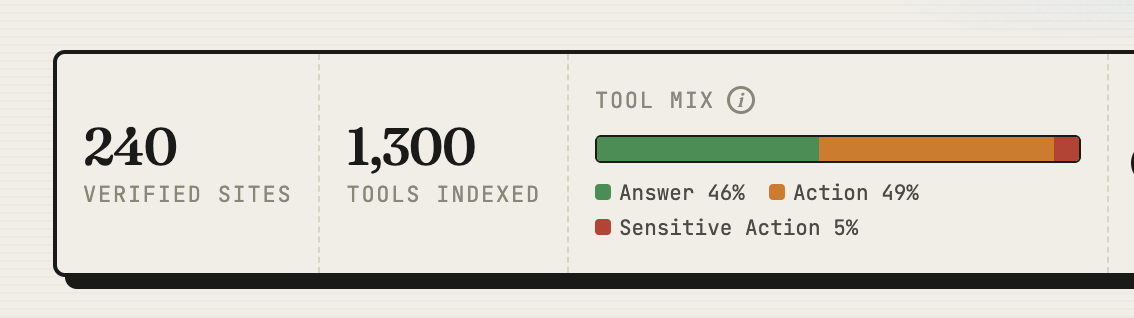
We track exactly this across the whole webmcp.com directory — every listed site has its tools classified into Answer, Action, and Sensitive Action, so you can see the tool mix of the agentic web at a glance:
What's in it for you, the site owner
There's a real benefit to adding WebMCP support:
You see the demand. You've never been able to read what users ask their AI assistant about you — prompts are a black box. Tool calls change that: every call hands you the query's parameters — the dates, the budget, the filters, the exact need. That's first-party intent data from a channel that had none.
You control the answer. When an assistant uses your tool, the answer comes from you — accurate, current, and on your terms — instead of stale training data or a third-party aggregator. Rather than figuring out your site on its own, the agent gets a guided tour.
You give users a better experience — and better experiences convert. WebMCP is a straight upgrade to your website. Users say what they want and get there, instead of hunting through menus, filters, and screens. The chain from intent to outcome gets shorter. Shorter chains convert better.
Worked example: a boutique hotel
Outcome: a booked room.
Working backwards, the chain is: does it have availability for my dates → what are the rooms like → what does it cost with everything included → hold it → book it.
That gives you five tools:
check_availability(dates, guests)        answer
get_room_details(room_id)               answer
get_total_price(room_id, dates)         answer   // taxes & fees included
hold_reservation(room_id, dates)        act
book_room(hold_id, guest_info)           transact
Co-browsing gets all five. Remote execution gets the first three, until you decide otherwise.
Notice what's not there: no list_all_rooms, no get_page_content, no wrapper around your CMS.
One more thing about stage five. book_room is exactly the kind of tool that should never fire on an agent's judgment alone — especially with a card on file, one slip and the agent has booked a room nobody asked for. WebMCP has a primitive for this: inside the tool's execute handler you call requestUserInteraction(), which pauses the agent mid-execution and puts the confirmation in front of the human. The agent halts, the user approves, the tool proceeds. Pair it with readOnlyHint on your answer tools so agents know which calls are safe to fire freely — and which ones stop and ask.
Anti-patterns
- One tool per button. Tools should map to intents, not UI elements.
- Wrapping your entire API. Twenty mediocre tools confuse the model; five sharp ones get used.
- Vague descriptions and loose schemas. The model chooses tools by reading descriptions. A tool it can't understand is a tool that doesn't exist.
- Ignoring page state. In co-browsing, the human sees the page. If your tool says one thing and the screen shows another, you've broken trust with both of them.
Start Monday
You don't need heavy lifting to get started with WebMCP. Pick one core outcome, work backwards from it, ship three answer tools, then expand from there. Just don't forget to list your site on webmcp.com afterward.